On-Premises Excel API: Full Control Over Your Data
Your finance team built a complex pricing model in Excel. Your actuaries maintain risk calculations that took years to perfect. Your tax department has compliance formulas that handle edge cases nobody else understands.
Now you need to scale these calculations across your organization. But there's a problem: your data can't leave your network.
Whether it's GDPR, HIPAA, financial regulations, or internal security policies—cloud solutions simply aren't an option for many organizations. You need the power of API-driven Excel calculations without sacrificing data sovereignty.
The Challenge: Excel at Scale Without the Cloud
Every enterprise faces the same dilemma:
Option A: Rewrite Everything
Rebuild years of Excel logic in Python, Java, or JavaScript. Spend months validating that your new code matches Excel's behavior exactly. Hope you didn't miss any edge cases.
Option B: Manual Processes
Keep emailing spreadsheets around. Accept the errors, version conflicts, and audit nightmares that come with it.
Option C: Cloud API
Use a cloud service, but accept that your sensitive data will be processed on someone else's servers.
None of these options work when you're dealing with sensitive financial models, proprietary pricing logic, or regulated data.
There's a better way.
The Solution: Build Locally, Deploy Internally
SpreadAPI's on-premises solution gives you the best of both worlds: modern API architecture with complete data sovereignty.
Here's how it works:
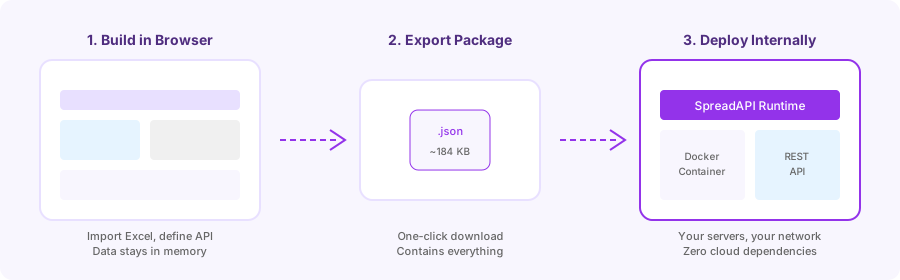
Step 1: Build in Browser
Everything happens in your browser's memory. Import your Excel file, define which cells are inputs and outputs, test your calculations—all without any data touching external servers.
Your workbook, your formulas, your test data: it never leaves your machine.
Step 2: Export Runtime Package
When you're satisfied with your API definition, click "Export for Runtime." You'll download a small JSON file (typically around 184 KB) that contains:
- Your complete workbook structure
- All formulas and cell references
- Input/output definitions
- API configuration
This file is everything the runtime needs to execute your calculations.
Step 3: Deploy on Your Infrastructure
Upload the package to SpreadAPI Runtime running on your own servers. Within seconds, you have a fully functional REST API that executes your Excel calculations—entirely within your network.
Enterprise Mode: Zero Cloud by Design
For organizations with strict data policies, SpreadAPI offers Enterprise Mode. When enabled, the "Save to Cloud" option is completely removed from the interface.
This isn't just a hidden button—it's an architectural guarantee. In Enterprise Mode, there's simply no code path that could send your data to external servers. Even accidental data leakage is impossible.
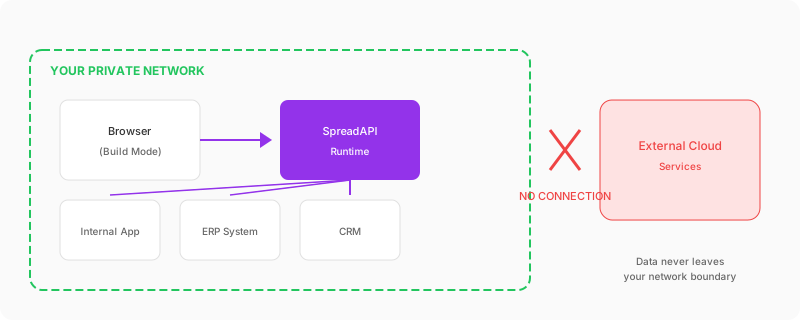
The Runtime Server: Simple, Secure, Scalable
SpreadAPI Runtime is a lightweight Docker container that runs your Excel calculations. Here's what makes it ideal for enterprise deployment:
No Database Required
The runtime stores everything in simple JSON files on the local filesystem. No PostgreSQL, no MongoDB, no Redis to configure or maintain.
No Outbound Connections
The runtime doesn't phone home, check for updates, or send telemetry. It works perfectly in air-gapped environments with no internet access at all.
Deployment in Minutes
# Pull the image
docker pull spreadapi/runtime:latest

# Run with your service directory
docker run -d \
  -p 3001:3001 \
  -v ./services:/app/services \
  -v ./logs:/app/logs \
  spreadapi/runtime:latest
That's it. Your Excel API is now running on port 3001.
Horizontal Scaling
Need more capacity? Run multiple containers behind a load balancer. Each instance is stateless—they all read from the same service files and can handle requests independently.
# kubernetes deployment example
apiVersion: apps/v1
kind: Deployment
metadata:
  name: spreadapi-runtime
spec:
  replicas: 3
  template:
    spec:
      containers:
      - name: runtime
        image: spreadapi/runtime:latest
        ports:
        - containerPort: 3001
        volumeMounts:
        - name: services
          mountPath: /app/services
Technical Specifications
Supported Excel Features
The runtime supports 500+ Excel functions, including modern array functions:
- Lookup: VLOOKUP, HLOOKUP, XLOOKUP, INDEX, MATCH
- Array: FILTER, SORT, SORTBY, UNIQUE, SEQUENCE
- Modern: LET, LAMBDA, dynamic arrays
- Financial: NPV, IRR, PMT, all standard financial functions
- Statistical: Full statistical function library
- Math & Trig: Complete mathematical operations
Performance
| Metric | Typical Value |
|--------|---------------|
| Cold start (first calculation) | 200-500ms |
| Warm calculation | 10-50ms |
| Complex workbook (1000+ formulas) | 50-200ms |
| Memory per service | 10-50MB |
API Endpoints
GET  /api/health              # Health check and version
GET  /api/services            # List all deployed services
GET  /api/services/{id}       # Get service schema
POST /api/execute/{id}        # Execute calculation
POST /api/upload              # Deploy new service
Execute a calculation:
curl -X POST http://localhost:3001/api/execute/pricing-model \
  -H "Content-Type: application/json" \
  -d '{"inputs": {"quantity": 100, "region": "EU"}}'
Response:
{
  "serviceId": "pricing-model",
  "inputs": { "quantity": 100, "region": "EU" },
  "outputs": {
    "basePrice": 4500,
    "discount": 450,
    "finalPrice": 4050,
    "deliveryDays": 5
  },
  "metadata": {
    "executionTime": "32ms"
  }
}
Compliance Checklist
For organizations evaluating on-premises solutions, here's how SpreadAPI Runtime addresses common compliance requirements:
| Requirement | SpreadAPI Runtime |
|-------------|------------------|
| Data Residency | All data on your infrastructure |
| Data in Transit | Internal network only |
| Data at Rest | Your encryption, your policies |
| Access Control | Integrates with your IAM |
| Audit Logging | Configurable request logging |
| External Dependencies | None—runs fully offline |
| Vendor Access | Zero vendor access to your data |
| Network Isolation | No outbound connections required |
Real-World Use Cases
Financial Services
A European bank runs loan amortization calculations for thousands of customers daily. Their Excel models contain proprietary risk adjustments that can't leave their infrastructure. With SpreadAPI Runtime, they process 50,000+ calculations per day—all within their private data center.
Insurance
An insurance company's actuaries maintain premium calculation models in Excel. These models represent decades of statistical refinement. The runtime lets underwriting systems call these calculations via API while keeping the intellectual property completely internal.
Tax & Compliance
A Big Four consulting firm has VAT calculation templates for 40+ jurisdictions. Client data can never touch external systems. SpreadAPI Runtime runs in their secure client-facing environment, letting consultants generate compliant calculations without manual Excel work.
Manufacturing
An automotive supplier calculates bill-of-materials costs with Excel models containing proprietary margin structures. Their ERP system now calls the runtime API to get real-time cost rollups—no cloud exposure of competitive pricing data.
Getting Started
- Try Enterprise Mode: Enable private mode in SpreadAPI and build your first service entirely in-browser.
- Export a Package: Test the export workflow with a simple calculation.
- Run Locally: Start the Docker container on your machine and verify it works.
- Deploy Internally: Move to your staging environment and integrate with your systems.
- Scale: Add monitoring, authentication, and horizontal scaling as needed.
Learn More
- On-Premises Overview — Full product details and pricing
- Technical Whitepaper — Deep dive into architecture and security
- Pricing — Compare cloud and on-premises options
Questions about deploying in your environment? Contact us at support@airrange.io
Related Articles
- Stop Reimplementing Excel Business Logic in JavaScript — Why rewriting Excel in code is usually a mistake
- Building AI Agents That Actually Use Your Excel Models — Connect AI to your calculations
- The Spreadsheet API Revolution — Why developers are moving away from file uploads